
Feature Introduction
Start Game
Start the game and wait for it to enter the main interface.
Warning
This feature is currently not supported on the Global server PC client. If you need this feature, please configure it in Software Settings → Launch Settings.
Collect Wasteland
Collect wasteland production, including the following options:
- Wellspring: Collect wellspring production
- Gather Magic Essence: Collect magic essence production items
- Deliver Orders: Complete order delivery
Daily Psychube (Will Analysis)
Farm daily free Will Analysis attempts, including the following options:
- Double Analysis Bonus Battle: Use stamina for combat when double analysis bonus is available
- Consume Candy: Automatically use psychube candy
Smart Balanced Material Farming
Detect the counts of 12 purple main-story materials in the warehouse, then automatically farm the optimal stage for the material with the lowest count. Options include:
- Consume Candy: Automatically use candy
- Custom Combat Count: Specify combat count. It will consume all stamina when disabled.
- Drop Statistics Report: Report stage drop data
Regular Combat
Execute regular stage combat, including the following options:
- Custom Combat Stage: Manually specify combat stage
- When disabled, you can select stage type (Main Story/Resource/Insight)
- When enabled, you can input specific main story stage number
- Consume Candy: Automatically use candy
- Custom Combat Count: Specify combat count. It will consume all stamina when disabled.
- Drop Statistics Report: Report stage drop data
Tips
Chapter 13 has been updated. Welcome to farm new stages to help update the one-image guide!
Event Token Farming
Farm event stages, including the following options:
- Rerun Mode: Choose whether it's a rerun event
- Event Difficulty: Select event stage difficulty
- Consume Candy: Automatically use candy
- Custom Combat Count: Specify combat count
Warning
When a main story version is live, disabling rerun mode will skip the current task. If you need to farm main story stages, please use the Regular Combat feature.
Auto Deep Sleep
Automatically complete Deep Sleep battles, including the following options:
- First Half Formation: Select formation for the first half area
- Second Half Formation: Select formation for the second half area
- Only Claim Weekly Shallow Sleep Rewards: Only claim rewards without battling
Note
- Avoid duplicating first and second half formations
- Supports both old and new formation systems
- Supports custom formation naming
- Future support for formations beyond the first four
Auto Awakening Dream
Automatically complete Awakening Dream battles, including the following options:
- Awakening Dream First Half Formation: Select formation for the first half area
- Awakening Dream Second Half Formation: Select formation for the second half area
Note
- Avoid duplicating first and second half formations
- Supports both old and new formation systems
- Supports custom formation naming
- Future support for formations beyond the first four
Bank Shopping
Automatically purchase specified items at the bank, including the following options:
- Counter Specials: Purchase counter special items
- Lower Counter: Purchase lower counter items
- Psychube Observation: Purchase psychube observation
- Dream Narrative: Purchase dream narrative
Claim Rewards
Claim various rewards, including the following options:
- Claim Mail Rewards: Collect rewards from mail
- Claim Task Rewards: Claim daily and weekly task rewards
- Claim Roar Roar Jukebox: Claim Roar Roar Jukebox rewards
- Event Box Rewards: Claim event box rewards
- Mystery Sea Weekly Sweep Rewards: Complete the Suspended in the Rain: Mystery Sea "Think" weekly sweep and claim rewards
Redeem Codes
Automatically enter and redeem codes, including the following options:
- Custom Redeem Codes: Enter one or more codes (separated by spaces, commas, or semicolons)
Note
Already-used codes for the current account are skipped automatically
Switch Account
Leave the field empty to scroll to the bottom of the account list and switch to the final account. If a target account is provided, the task will keep scrolling through the account list until it finds and switches to that account. The task fails if the target account cannot be found.
Note
- After switching, you can continue adding tasks for multi-account multi-configuration task execution
- Currently only supports Official server
- Only supports emulator environments with an actual unscaled resolution of 1280×720
- The emulator DPI must be set to 240
Switch Art Framework
Switch the main interface art framework. Available options:
- Suitcase Standard (Default)
- What Icarus Saw
- Diminuendo Heartstring
- Paper-Cut Plum Adornment
Close Game
Close the game process.
Warning
This feature is currently not supported on the Global server PC client. If you need this feature, please configure it in Software Settings → Launch Settings.
Outside Deduction: The Series of Dusks
Roguelike mode for farming credits, including the following options:
- Catalyst Selection: Choose the catalyst to use (only effective in non-fast mode)
- Fast Mode: When enabled, only uses the Arcane Lantern to farm the first floor
- Deduction Difficulty: Select deduction difficulty
Fast Mode
Warning
- Before using fast mode, please fully level up
Engrave Growth - Song of GuidanceandEngrave Growth - Building Code - Please increase difficulty level as much as possible (difficulty 11 achieves maximum credit efficiency of 200%) and max out credit efficiency bonuses in the tech tree to prevent insufficient score of 2,500 leading to farming failure
Non-Fast Mode
Tips
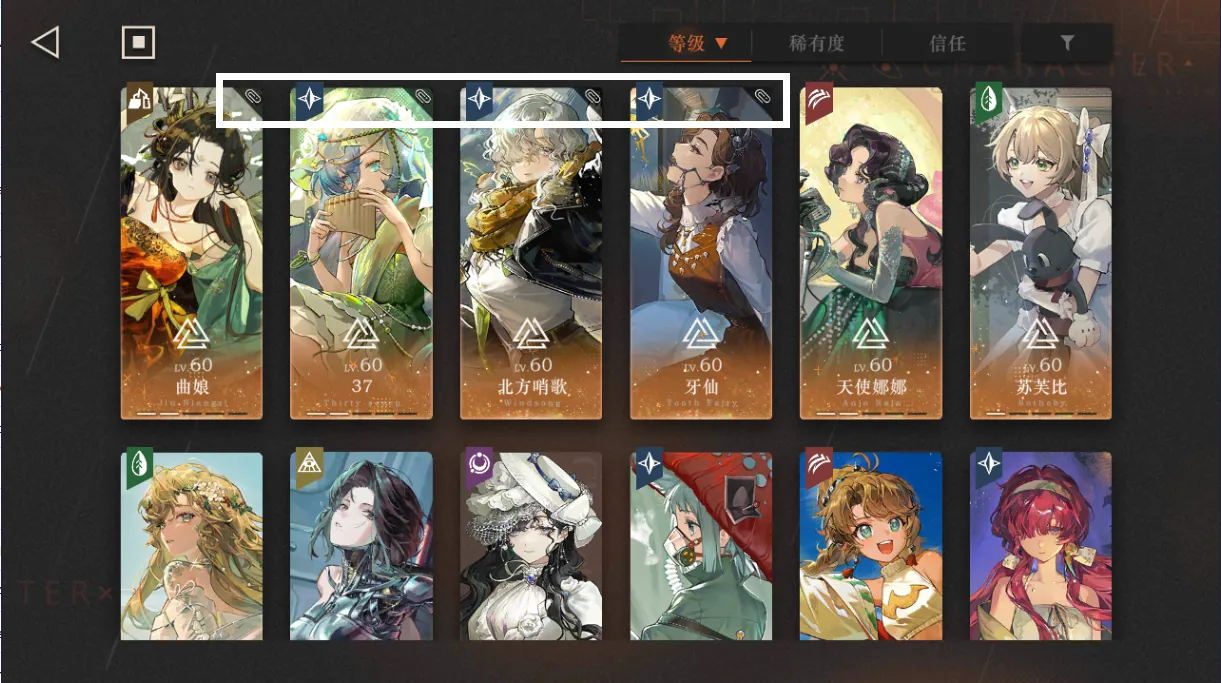
- Before use, you can pin (mark) four characters in your box as deployment characters
- Team composition should include a healer
- Please ensure the last battle was in auto-battle mode before use, M9A cannot check if it's in auto-battle
Warning
M9A does not handle story content, tutorials, and other elements that only appear when playing roguelike for the first time. You need to complete these once manually before using this feature.
Note
Due to the complexity of this feature's implementation, strange issues may occur. If possible, please enable emulator screen recording. When encountering problems, try to preserve sufficient information (all content under debug and logs directories) so developers can quickly locate and resolve the issue. Click here to submit an issue
Pinning Demonstration
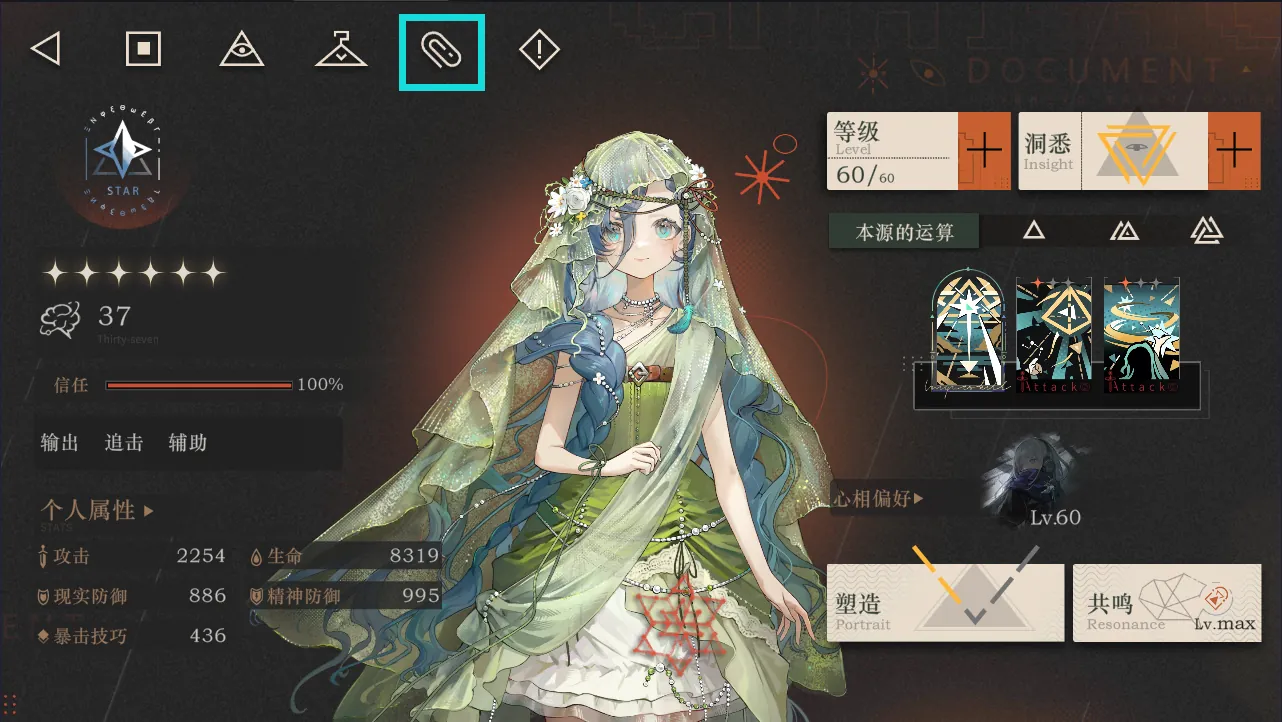
Pinning Successful
Outside Deduction: The Syndrome of Silence
Syndrome of Silence roguelike mode, including the following options:
- Battle Formation: Select battle formation to use
- Carry a Good Companion: Choose whether to carry a good companion
- Difficulty Selection: Select game difficulty
- Instrument Selection: Select instrument to use
Warning
- M9A does not process the gameplay instructions page that only appears when playing roguelike for the first time. Please manually progress to at least the second floor before using
- M9A cannot check if it's in auto-battle mode. Please ensure your most recent battle was in auto-battle mode before using
Tips
Based on testing, it's best to choose difficulty 2 or 3 for the mission. Difficulty 4 makes it easy to die in battle
Standalone Tasks
The following tasks need to be run independently at specified interfaces and cannot be combined with other tasks:
Rerun Event Stage Clear
Complete rerun event stage clear according to task list, including the following options:
- Consume Candy: Automatically use candy
Note
This task completes tasks according to the task list, only supports previously completed rerun event stages
Artefact Masters (Rubbing Acrobatics)
Complete the first floor sweep of the arena.
Warning
Please manually open the arena page before running this task
When the Alarm Sounds (High-Level Required)
Complete When the Alarm Sounds sweep, including the following options:
- Sweep Difficulty: Select sweep difficulty
Warning
This feature does not change characters and takes all debuffs, so it's only suitable for high-level teams
Tips
- Recommended team: Big Three (37, Eternity, 6) + 66, Tooth Fairy + Tutu, or pursuit team
- Please manually open the When the Alarm Sounds main page (with "Rain Mark Tracking" and "Rain Mark Disposal" text in the middle) before use
- Fast option: Directly fight boss stage without 5th position buff, suitable for fully-built Big Three + double healer team
- Non-fast mode will max out 5th position buff before fighting boss, improving clear stability
- Test team: 37 + Eternity + Melmoth + Semmelweis + Tutu (note: place main DPS in 5th position)
Event Stage Clear (Main Story and Events)
Automatically clear main-story / event stage maps, including the following options:
- Select Event: Choose current page, current event, or a specified past event
- Clear Mode:
- Story/Main: Automatically detect unfinished stages marked with a gray star next to the stage number and clear them in order; after finishing, it will try Path stages
- Exploration Mode: Unlocked in later event phases; if currently on the Story page it will switch to Exploration first. Main-story maps without Exploration mode are skipped automatically
- Consume Candy: Automatically use candy when stamina is depleted
Warning
- Please manually open the main-story / event stage map page before running this task
- If the task hits mini-games, special tutorials, or other screens it cannot handle, it will stop automatically (error screenshots are saved under
debug/on_error). Finish those manually, return to the stage map page, and rerun to continue
Critter Crash Fast Farm
Quick farming in the Critter Crash interface.
Warning
- Start in Critter Crash interface
- Supports CN server version 3.5
- Please play two rounds manually first to raise alert level to 3 before using
Pre-Storm Protocol
Complete Pre-Storm Protocol mini-game, including the following options:
- Pre-Storm Protocol Farming Mode: Select corresponding mode based on tutorial progress
Warning
This task needs to run independently, please navigate to the mini-game main page before running
Note
This task has two scenarios:
- Have not defeated the boss on the third day of the tutorial (i.e., clicking "Start Simulation" does not lead to difficulty selection interface)
- Have defeated the boss on the third day of the tutorial (i.e., clicking "Start Simulation" leads to difficulty selection interface)
Please select the corresponding option based on your situation
UTTU Flicker Assembly
Automatically clear UTTU Flicker Assembly stages.
Warning
- Start after configuring your team on the first floor of each UTTU phase
- Clears four floors automatically; trial characters are removed on the next floor, so please use your own characters
Complete Induction
Complete the Complete Induction mini-game.
Warning
This task needs to run independently. Please navigate to the mini-game main page before running.
Note
Please complete one full round manually first to finish the tutorial, then start the task on the interface with the "Start Research" button.
8-bit Arcade Show
Complete 8-bit Arcade Show mini-game, including the following options:
- Stage Difficulty: Select stage difficulty
- Farming Mode: Select farming mode based on your needs
Warning
This task needs to run independently. Please navigate to the difficulty selection page before running.
Note
This task has two scenarios:
- Clear the first floor then exit directly (stable)
- Keep going as far as possible (continue fighting after the first floor without exiting)
Please select the corresponding option based on your situation
Character Upgrade (beta)
Automatically upgrade the character (resonance + level) when entering the character detail page, until materials are insufficient or the cap (Insight 3 / Resonance 9) is reached, including the following options:
- Consume Candy: Automatically use candy when stamina is insufficient
Warning
Please manually enter the character detail page (showing "Personal Attributes") before running. Only supports farming attribute breakthrough materials; non-attribute breakthrough materials need to be farmed manually. This is a beta feature; please report any issues encountered.
Trust Rewards
Start from the main interface to automatically enter the character list, sort by trust in descending order, and collect Single/Culture trust rewards for characters with unlocked trust rewards.
Note
Start the task from the main interface. Characters are sorted by trust descending and the task scrolls through the full list automatically. Only characters with unlocked trust rewards are collected.